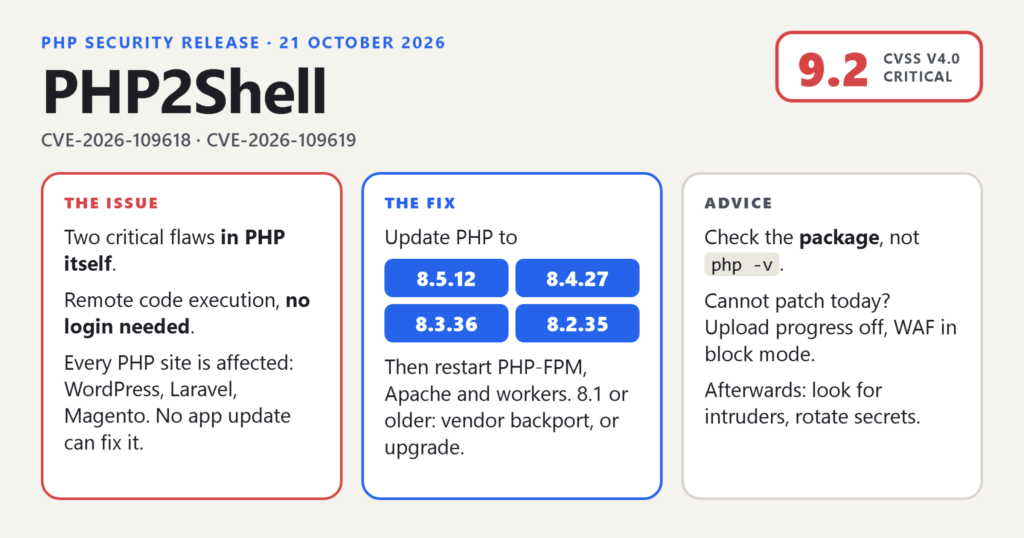
On 21 October 2026 the PHP project released PHP 8.5.12, 8.4.27, 8.3.36 and 8.2.35 to fix two critical vulnerabilities, CVE-2026-109618 and CVE-2026-109619. Both are rated 9.2 on CVSS v4.0. Both allow an attacker to run code on a web server without logging in. Researchers had been calling the pair “PHP2Shell” before the fix shipped, and the name has stuck.
This one is different from the security releases we are used to. The bugs are in the PHP runtime itself, not in a plugin, a framework or an application, so every PHP website and application is affected whatever it runs, and no WordPress, Laravel or Magento update can fix it. The details leaked a day before the planned release. Attack attempts were seen before the patch existed. And the advisory says plainly that there are no complete mitigations: updating is the only safe choice.
I spent the day after the release checking the servers I look after and reading everything the PHP team, the distributions and the security firms published. This post is the result: what happened, how it affects servers, how to check whether a server needs the fix, how to apply it on each platform, what to do if you cannot patch today, and what to check afterwards. The situation is still moving, so everything here is as of 22 October 2026. The sources are listed at the end, and the official advisory at php.net is the one to trust if anything below has changed.
One editorial choice up front. I am not going to describe how the two bugs are triggered. The GitHub advisories have the full technical detail for people who need it, and with exploitation under way the useful thing a post like this can do is help you patch, not help anyone else.
What happened, in short
The two vulnerabilities carry the official names “RCE via OOM corruption” (CVE-2026-109618) and “RCE via stale global state” (CVE-2026-109619). Both sit in the way the PHP engine manages a request’s lifetime. For CVE-2026-109618, the PHP project confirmed complete remote code execution over plain HTTP against Apache with mod_php on default settings, before any application code runs. For CVE-2026-109619, code execution was confirmed against both mod_php and PHP-FPM, and researchers at Wiz also showed a related path that reads server memory, which means passwords, tokens, API keys and certificates held by a worker could be exposed.
The timeline matters, because it tells you how far back to look in your logs.
- 11 August 2026. The first of the bugs is reported privately to the PHP security team. A second report from Wiz Research follows on 24 August.
- 17 October. Amazon’s honeypot network records an exploitation attempt, four days before any public word. Amazon says it is unclear how the actor obtained the details while the bugs were under embargo.
- 20 October. Details leak online. PHP publishes an advance notice and brings the release forward a day, to 21 October at 14:00 UTC.
- 21 October, 03:02 UTC. Cloudflare enables blocking rules for all of its plans, including the free one, about nine hours ahead of the release.
- 21 October, morning. Attack attempts are reported against live sites, hours before the fix exists. Cloudflare’s chief executive later describes thousands of attempts in the ten hours before disclosure, rising into the millions afterwards, with attackers changing their payloads to get past the rules.
- 21 October, 14:00 UTC. PHP 8.5.12, 8.4.27, 8.3.36 and 8.2.35 are released. CISA publishes an alert the same day urging immediate patching, and recommends taking systems offline if they cannot be updated or run PHP 8.1 or older. The UK’s NCSC says the same.
- 22 October. Sansec, which watches e-commerce sites, reports that mass exploitation looks less likely than feared, because working attacks need specific conditions on the target. That is good news, and not a reason to wait. The public proof-of-concept code is being refined in the open.
How this affects web servers
Every PHP that serves web requests is affected. The advisory names PHP-FPM, Apache with mod_php, php-cgi, FrankenPHP and LiteSpeed. The PHP project considers the risk highest for mod_php, where the demonstrated attack needs nothing from the application. PHP-FPM ends a worker when request start-up fails, which closes one path, but it is not immune and a code execution path against FPM was confirmed. If you only use PHP on the command line, for cron jobs and scripts, nothing is listening for requests, but update anyway, because the next person to configure that machine may not know that.
Every version is affected. The bugs go back through every PHP release of the last two decades. The fixes are in 8.2.35, 8.3.36, 8.4.27 and 8.5.12. PHP 8.1 and older receive no releases from the PHP project any more. Some distributions have backported the fix to the versions they ship, and the PHP security team published minimal source patches for 7.4, 8.0 and 8.1 on GitHub for people who build from source. More on that below.
Every application is affected, and none of them can fix it. WordPress.org put it clearly: no WordPress update is required or planned, because the fix is a PHP update. The same is true of Laravel, Symfony, Drupal, Joomla, Magento, phpMyAdmin, Nextcloud and everything else written in PHP. Researchers demonstrated code execution against current versions of most of those with the application’s own code untouched. Keeping your plugins updated is still right; it just does not help here.
What an attacker gets is code execution as the user the web server runs as, which on most servers is enough to read every file of every site on that server, the database credentials in their configuration, and anything else that user can reach. On a shared server that may be one site; on a badly configured one it may be all of them.

How to check whether a server needs the fix
Four questions, in order. Most of the mistakes I have seen this week come from answering only the first one.
1. Find every PHP on the machine
The PHP that answers php -v on the command line is often not the PHP that serves your website. Servers accumulate versions: a distribution package, a second branch from a PPA, the builds a control panel installs per site, a container image, a binary bundled inside some other product. Count them all.
# Which php binaries are on the PATH, and what the default points to
which -a php
update-alternatives --display php 2>/dev/null

# Debian and Ubuntu: one folder per installed branch, and the packages
ls /etc/php
dpkg -l 'php*' | awk '/^ii/ {print $2, $3}'

# RHEL, AlmaLinux, Rocky: packages and the enabled module stream
rpm -qa 'php*' | sort
dnf module list --enabled php

# Anything else that looks like PHP, including bundled copies
find / -type f \( -name 'php-fpm*' -o -name 'php' -o -name 'php[0-9]*' \
  -o -name 'lsphp' -o -name 'frankenphp' \) 2>/dev/null

# Containers
docker ps --format '{{.Names}} {{.Image}}'
docker exec <container> php -v
On cPanel servers the EasyApache builds live under /opt/cpanel as ea-php82, ea-php83 and so on, and each site picks one in MultiPHP Manager. On Plesk, plesk bin php_handler --list shows every handler and its version. On Windows, WampServer, XAMPP and Laragon each keep their own PHP folders, and IIS points at a PHP folder in its handler mappings. None of those are touched by Windows Update.
Then check what the web actually runs, because that is the copy that matters most. In WordPress, Tools, Site Health, Info, Server shows the version the site runs on. On any site, a temporary file containing <?php phpinfo(); shows the version, the SAPI and the loaded php.ini, and should be deleted the moment you have read it. A response header will often tell you too:
curl -sI https://example.com/ | grep -iE '^(server|x-powered-by):'If that header reveals your PHP version to the world, note it down as something to switch off later. I will come back to it.
2. Compare the package, not the version string
If you build from source, use the official Windows binaries, Docker’s php: images, Homebrew, or the ondrej PPA and packages.sury.org on Debian and Ubuntu, then the fixed versions are the upstream ones: 8.2.35, 8.3.36, 8.4.27 and 8.5.12, and php -v tells you the truth.
If you use the packages that come with your Linux distribution, the fix is backported under the old version number, and php -v will still show the old version after you have patched. You have to compare the package version against the distribution’s advisory instead.
| Distribution | Package | Fixed version |
|---|---|---|
| Ubuntu 24.04 | php8.3 | 8.3.6-0ubuntu0.24.04.13 |
| Ubuntu 22.04 | php8.1 | 8.1.2-1ubuntu2.28 |
| Ubuntu 26.04 | php8.5 | 8.5.4-0ubuntu1.5 |
| Ubuntu 20.04 (ESM, needs Ubuntu Pro) | php7.4 | 7.4.3-4ubuntu2.29+esm5 |
| Debian 13 | php8.4 | 8.4.27-1~deb13u1 (DSA-6574-1) |
| Debian 12 | php8.2 | 8.2.35-1~deb12u1 (DLA-4848-1) |
| AlmaLinux 10 | php | 8.3.33-1.el10_2.alma.1 |
| AlmaLinux 9, stream php:8.3 | php | 8.3.33-1.module_el9.8.0+328+1fdeb728.alma.1 |
| AlmaLinux 8, stream php:8.2 | php | 8.2.33-1.module_el8.10.0+4320+c30d6dbb.alma.1 |
Those are the versions published on 21 and 22 October; your distribution’s own security tracker is the authority, and Red Hat’s own errata were still arriving when I wrote this. The quickest check on a Debian or Ubuntu machine is whether the package changelog mentions the CVE:
zgrep -E 'CVE-2026-10961[89]' /usr/share/doc/php8.3-fpm/changelog.Debian.gz
apt-cache policy php8.3-fpm        # Installed vs Candidate
And on the RHEL family:
rpm -q --changelog php-common | grep -E 'CVE-2026-10961[89]'
dnf updateinfo list --security | grep -i php
If the changelog says only “new upstream version”, compare the version number against the table.
3. Know which SAPI you run
The SAPI is the piece that connects PHP to the web server, and it decides how exposed you are. Apache’s mod_php loads PHP inside the Apache process. PHP-FPM runs separate worker processes that nginx or Apache talk to. LiteSpeed uses lsphp, and FrankenPHP embeds PHP in a Go server.
# mod_php shows up as php_module (or php7_module) in the loaded modules
httpd -M 2>/dev/null | grep -Ei 'php|mpm_'
apache2ctl -M 2>/dev/null | grep -Ei 'php|mpm_'

# worker processes
ps -eo pid,comm,args | grep -E 'php-fpm|lsphp|frankenphp' | grep -v grep
If you see php_module next to mpm_prefork_module, you run the configuration the PHP project rates as highest risk. Patch that server first.
4. Confirm that nothing still runs the old binary
Installing the package is not the end. A process keeps running the code it loaded until it is restarted, and PHP lives in several places that are restarted separately: the FPM pool, Apache, queue workers started from the command line, long-running daemons such as Laravel Horizon or Octane, and scripts started by cron that run for hours.
# Any process still mapping a PHP file that has since been replaced
sudo grep -lE ' /(usr|lib|opt).*\(deleted\)$' /proc/[0-9]*/maps

# Debian and Ubuntu: services that need a restart
sudo needrestart -b -r l

# The versions the services themselves report
php-fpm8.3 -v
php8.3 -v
Empty output from the first command means no process is still running a replaced PHP. The pattern is limited to those folders because OPcache creates deleted mappings of its own inside every FPM worker, which are harmless.
How to apply the fix
The general shape is the same everywhere: install the fixed package or build, restart everything that runs PHP, verify, then revert any emergency settings. The details differ by platform.
Debian and Ubuntu, including the ondrej PPA and packages.sury.org
sudo apt-get update
apt list --upgradable 2>/dev/null | grep php

# Repeat for every installed branch; the quotes stop the shell expanding the wildcard
sudo apt-get install --only-upgrade -y \
  -o Dpkg::Options::="--force-confold" \
  $(dpkg -l 'php8.3*' | awk '/^ii/ {print $2}')

sudo systemctl restart php8.3-fpm
sudo systemctl restart apache2      # only if you run mod_php; a full restart, not reload
The --force-confold option keeps your existing php.ini and pool files. If apt cannot see the new version, a mirror is lagging; try again in an hour, or point the PPA source at ppa.launchpadcontent.net. On Ubuntu 18.04 and 20.04 the fix is only available through Ubuntu Pro’s extended security maintenance, which sudo pro fix CVE-2026-109618 will tell you about.
RHEL, AlmaLinux and Rocky, including Remi
sudo dnf clean metadata
sudo dnf upgrade 'php*'
sudo systemctl restart php-fpm
sudo systemctl restart httpd       # only if you run mod_php

rpm -q php-common                  # compare with the fixed version for your stream
AlmaLinux published patched builds for every stream on 21 October, including the retired 7.2, 7.3, 8.0 and 8.1 streams, with a warning that the retired ones are not promised future fixes. Red Hat’s own errata were partial on the 21st and still arriving on the 22nd, so check dnf updateinfo rather than assuming. Remi’s repository had no packages on release day, as the PHP announcement warned, and had all four branches by the next day. If you are on RHEL 8 and a plain dnf install php gave you PHP 7.2 years ago, this is the moment to switch streams:
sudo dnf module reset php
sudo dnf module enable php:8.2
sudo dnf distro-sync 'php*'
Amazon Linux 2023 had no fixed package on the 21st, with AWS targeting the 22nd. Check dnf updateinfo there too.
cPanel and WHM, Plesk, DirectAdmin
Control panels ship their own PHP builds, so updating the operating system does not patch the PHP your sites use. On cPanel, update cPanel itself and then the EasyApache packages, either from WHM’s EasyApache 4 screen or with the system package manager, then check MultiPHP Manager for sites still assigned to an old branch. cPanel published fixed ea-php packages on the 21st, and CloudLinux users should also watch for its own updates. On Plesk, install the latest Plesk update and then update the PHP components through the Plesk installer; Plesk shipped fixed 8.2 to 8.5 builds on the 21st, while its 7.4 to 8.1 builds were still being prepared. Whatever the panel, finish with a restart of every PHP handler and a look at which sites run which version.
Docker and containers
Pull the fixed image tag, rebuild your own images on top of it, and recreate the containers. A running container that you patch by hand is fixed until it restarts from the old image.
docker pull php:8.3-fpm
docker build --pull -t myapp .
docker compose up -d --force-recreate
docker exec <container> php -v
The official php: images were rebuilt on amd64 and arm64 by the 22nd. Release-candidate tags were not fixed. If your image is built on a distribution’s PHP packages rather than the official image, it inherits that distribution’s patch status, so check the package inside the container the same way as on a server.
Windows: IIS, WampServer, XAMPP, Laragon
The fixed Windows builds are on windows.php.net, in thread-safe and non-thread-safe variants. Apache with mod_php needs the thread-safe build; IIS with FastCGI and most other setups need the non-thread-safe one. The update is a folder swap: download the build, unpack it next to the old one, copy your php.ini across, point the web server at the new folder, and restart it.
WampServer users have it easier: the add-on installers for 8.2.35, 8.3.36, 8.4.27 and 8.5.12 appeared on the WampServer add-ons site the day of the release, and after installing one you switch Apache to it from the tray menu, which rewrites the LoadModule php_module line in httpd.conf for you. XAMPP keeps its PHP in its own folder, so a system update does nothing; replace the folder. On IIS, update the path in the handler mapping and restart the application pool. In every case, delete or rename the old folders once you are sure nothing uses them, so they cannot be switched back to by accident.
macOS, Herd and FrankenPHP
Homebrew had all four branches within a day: brew upgrade php or the versioned formula you use. Laravel Herd bundles its own PHP and updates it through the app. FrankenPHP 1.13.2 contains the fix; if you use it through Laravel Octane, delete the frankenphp binary Octane downloaded into your project folder, or it will keep running the old one.
Laravel Forge and other managed servers
Forge installs PHP from Ondřej Surý’s packages, and Ubuntu’s unattended upgrades only apply updates from Ubuntu’s own repositories, so Forge’s automatic security updates do not patch PHP. You do it yourself, once per installed version, from the PHP tab of the server dashboard with “Update PHP”, which also repairs the package source if needed. Then restart the long-running processes that the package upgrade does not touch:
php artisan queue:restart
php artisan horizon:terminate
# Octane: stop it and start it again; octane:reload keeps the old PHP
If you use a managed host where you cannot touch PHP, your job is to confirm, not to assume. Most large hosts began rolling out patches on the 21st, several put WAF rules in front of customers while they did, and a few asked customers to confirm with support. Check your host’s status page, and if your site is on PHP 8.1 or older, ask what they are doing about it.
Restart properly
- PHP-FPM: restart the service. A reload also loads the new binary, but a restart is simpler to reason about.
- Apache with mod_php: a full restart. In testing, a graceful restart or reload kept the old PHP library loaded.
- LiteSpeed: upgrade the lsphp packages, then
pkill lsphp. Restarting LiteSpeed alone does not restart PHP. - Queue workers and daemons:
queue:restart,horizon:terminate, a full Octane restart, and anything you run under Supervisor or systemd that executes PHP. - Cron: a long-running PHP script started before the update finishes on the old code; let it finish or restart it.
If you run PHP 8.1 or older
You have four options, in order of preference. First, upgrade to 8.4 or 8.5, testing on a staging copy first; most well-maintained applications make the jump with little trouble, and this is the only option that solves the next release too. Second, use your distribution’s backport if it has one: Ubuntu 22.04 patched php8.1, Ubuntu 20.04 patched php7.4 for Pro subscribers, and AlmaLinux patched its old streams. Third, if you build from source, apply the minimal patches the PHP security team published on GitHub in branches named PHP-8.1-CVE-2026-109618-109619 and the same for 8.0 and 7.4; be aware they are minimal, disable the session upload progress feature entirely, and do not include the new memory safety limit. Fourth, if none of those is possible today, take the server off the internet, or behind a VPN, until one of them is. That is CISA’s and the NCSC’s advice, and it is mine.
After updating: verify, then revert the emergency settings
Run the checks from the previous section again: the package version, the SAPI’s own version report, and the process check for anything still running old code. Then put back any settings you changed as a stopgap. In particular, if you set memory_limit to -1 while waiting for the patch, restore a real value: the fix adds a hard memory limit above the configured one, and a worker that reaches it now exits with code 137 rather than recovering, so an unlimited setting is no longer a free choice.
Two regressions were reported in the first day, a garbage-collection crash involving SimpleXML on 8.4.27 and 8.5.12 that is fixed in source and awaiting a release, and session loss with upload progress in some setups. Neither is a reason to stay on an unpatched version.
If you cannot patch today
The PHP announcement lists interim measures, with a sentence I will repeat because it is the whole point: they reduce exposure to specific attack paths but do not make an installation safe. Use them while you arrange the update, not instead of it, and restart every worker after each change, because settings applied through ini_set() or .user.ini come too late to help.
- Set
session.upload_progress.enabled = 0in php.ini, the FPM pool or the server configuration. Most observed attacks go through this feature, and the advisory suggests leaving it off afterwards if nothing uses it. WordPress does not. - On PHP 8.5, set
fatal_error_backtraces = 0. - Set
memory_limit = -1administratively, withphp_admin_valuein the pool or Apache configuration so that no application can put a finite limit back, and accept that one request can then use all the memory the worker can get. Do not useRLIMIT_ASorRLIMIT_DATAas a substitute. - Keep requests small.
post_max_size = 8Mwhere the application takes no uploads, 32M where it does, withupload_max_filesizebelow it, and limits at the web server or proxy on request size, number of fields and multipart parts, including requests that arrive without a usable Content-Length. If the application never accepts multipart form data, block it at the front door; that breaks file uploads, so know what you are breaking. - Fix the fatal errors you can reach from outside. Timeouts, failing callbacks, deprecated settings applied per request. Hiding them with
display_errorsor@does not help. - Put a WAF in front and make sure it blocks rather than logs. Cloudflare’s managed rules for these CVEs run on every plan, including Free, since 03:02 UTC on the 21st; paying customers should confirm the managed ruleset is in block mode. A WAF is a layer, and attackers were adapting payloads to get past it within hours.
- Or take it offline. For a server on PHP 8.1 or older with no fix available, this is the honest option.
Give every unpatched system a named owner and a date. “Soon” is how these things stay unpatched for a year.
After the patch: assume you may have been visited
Attempts were recorded from 17 October, and in volume from the morning of the 21st. If a server faced the internet unpatched during that window, patching closes the door but does not tell you whether anyone came through it. No official indicators of compromise had been published when I wrote this, so you are looking for the things any intruder does.
- Processes that should not exist. The web server or PHP workers starting shells, interpreters or download tools:
sh,bash,python,perl,curl,wget,nc. On Linux,ps -ef --forestshows the parentage; endpoint tools can alert on it continuously. - New or changed files in the web root.
find /var/www -newermt 2026-10-17 -name '*.php'is a start, with the uploads and cache folders looked at separately because they are writable. On WordPress,wp core verify-checksumsandwp plugin verify-checksums --allcompare the files against the originals, and the Users screen should contain no administrator you do not recognise. - Persistence. New cron entries, systemd timers, SSH authorised keys, system users, and scheduled tasks on Windows.
- The logs. Bursts of “Allowed memory size exhausted” errors in the PHP error log from a single client, unusual POST requests, and requests to PHP files that are not part of your site. The advisory warns that a clean log is not proof of safety, so treat this as one signal among several.
If you find something, isolate the server, preserve the web server and PHP logs, and rebuild from a known-good backup rather than cleaning in place. And whether or not you find anything, rotate the secrets on any server that was exposed while unpatched: database passwords, application keys, API tokens, mail credentials. A path that reads worker memory was demonstrated, and secrets are cheap to rotate and expensive to leave.
My recommendations beyond this patch
- Stay on a supported branch, and plan the next move now. PHP 8.2 stops receiving security fixes on 31 December 2026, ten weeks from the day of this release. Anyone still on 8.1 found out this week what unsupported means. Make 8.4 or 8.5 the target and start the compatibility testing.
- Prefer PHP-FPM behind nginx or Apache over mod_php. It was the less exposed configuration this time, it isolates sites from each other, and it has been the recommended setup for years anyway.
- Keep the attack surface small by default. Leave
session.upload_progress.enabledoff unless something needs it. Setexpose_php = Offso the version is not advertised in response headers. Keeppost_max_sizeandupload_max_filesizeat the smallest values the application works with, and enforce request limits at the proxy. - Know what your automatic updates cover. Unattended upgrades on Ubuntu do not touch packages from a PPA. Control panels patch their own PHP on their own schedule. Containers never update themselves. Write down, for each server, where PHP comes from and what updates it.
- Subscribe to the announcements. The php.net releases feed and the distribution security lists would have given you a day’s notice of this one. A day is a lot.
- Keep an inventory and a runbook. A list of servers, PHP versions, SAPIs and the exact restart commands turns a critical release from an afternoon of discovery into twenty minutes of work. I wrote mine on the 21st and it already paid for itself on the 22nd.
- Back up and test, but do not let that delay a critical patch by days. A patch release within a branch is the lowest-risk change you will make all year. Take a snapshot, apply it, check the site, move on.
- Treat a WAF as a layer, not a fix. It bought people hours this week. It did not buy anyone safety.
- If you run WordPress and someone else runs the server, your whole job is to confirm the PHP version in Site Health and ask your host. If you run the server yourself and it is on PHP 8.1 or older, upgrade or take it offline.
If you are not sure where your own site stands, Encompile does a free website checkup every week for a set number of sites, and this week the PHP version is the first thing it looks at.
Sources
- PHP security advisory, 21 October 2026, and the release notes for 8.5.12, 8.4.27, 8.3.36 and 8.2.35
- GitHub advisories GHSA-w8hw-w9fx-j79w and GHSA-6wmf-4rv5-p3rp
- CISA alert and the WordPress.org notice
- Cloudflare: protections against php2shell
- Rapid7, Huntress, Sansec and The Register on the timeline and exploitation
- AlmaLinux, the Debian and Ubuntu security trackers, and Mattias Geniar’s patching notes for package versions and restart behaviour
- Laravel Forge knowledge base, Codeable’s host round-up and the WampServer add-ons site